Crewlogout com: Meaning, Uses, Safety, and Current Status 2026
Many people search for Crewlogout com after seeing the address on a cruise ship, internet login screen, old document, or browser history. The unusual name can make users think it is a crew portal, work platform, or employee management website.
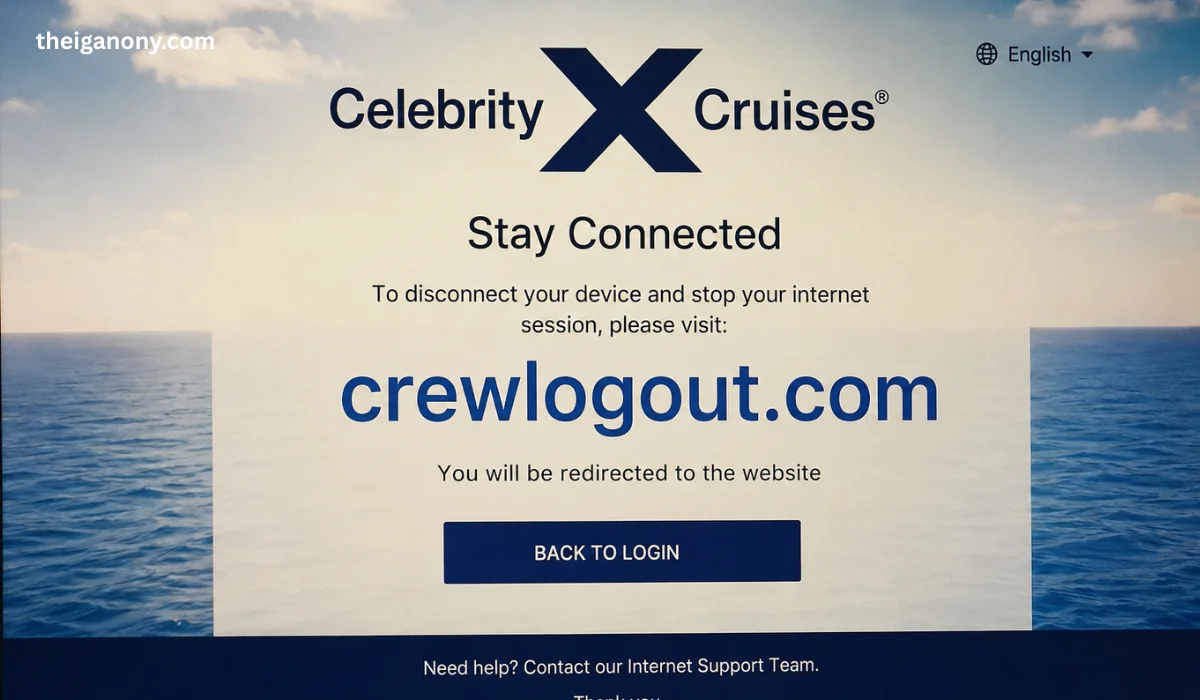
Available public information tells a simpler story. The address has mainly appeared as a tool for ending an onboard internet session, especially on cruise networks used by crew members and other connected users.
However, the website does not appear to offer the same working function in 2026. Visitors may now see a parked page or a basic domain screen instead of an active logout service.
This article explains the domain, its past use, its current status, and the steps users should take before trusting it. It also clears up misleading claims that describe the site as a complete workforce management platform.
What Is crewlogout com?
The term crewlogout com refers to a web address that was connected with an internet disconnection process. A user could enter the address in a browser while connected to a supported onboard network.
The page would then help close the active internet session. This process could allow the user to stop using paid minutes, protect the session, or connect another approved device.
The address was not the same as that of a typical public website with articles, products, and user profiles. It worked more like a network command page that depended on the ship’s local internet system.
Because of this setup, the domain might only work correctly when a person is connected to a certain onboard Wi-Fi network. Opening it through a normal home internet connection could show a different page or no useful service.
| Detail | Available Information |
|---|---|
| Domain type | Internet logout address |
| Main known use | Ending an onboard Wi-Fi session |
| Common users | Cruise crew or connected onboard users |
| Account creation | No confirmed public signup system |
| Workforce tools | Not reliably verified |
| Current 2026 status | Appears parked or inactive |
| Safe to enter passwords? | Not unless officially instructed |
| Best support source | Ship IT desk or crew support team |
Why Was the Address Used on Cruise Ships?
Cruise ships often use captive portals to control internet access. A captive portal is the page that appears when a user joins a Wi-Fi network and needs to sign in.
These systems can track the connected account, package duration, and number of active devices. When the user finishes browsing, a logout page may close the connection properly.
Old connection instructions show that crewlogout com could serve this purpose. Users were told to type the address into a browser when they wanted to disconnect from the network.
The process was useful on packages that allowed only one active device. A proper logout could free the connection before the user moves from a phone to a laptop.
How the Logout Process May Have Worked
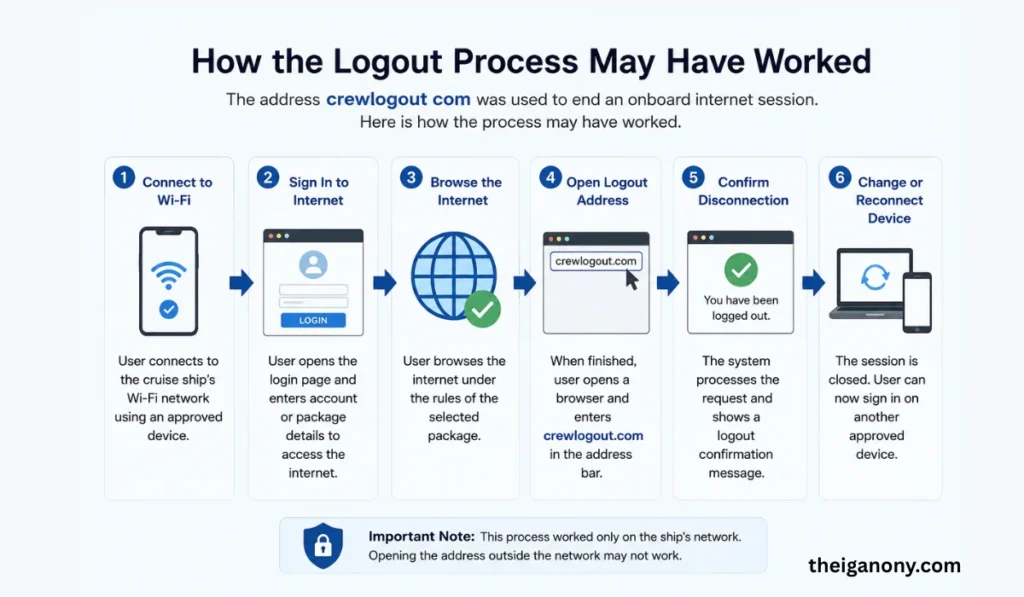
A user first connected a phone, tablet, or computer to the ship’s Wi-Fi. The network then opened a sign-in page or asked for account information.
After the login, the user could browse under the rules of the selected package. The network might record the session time and the number of connected devices.
When the person entered crewlogout com, the local network could send the browser to an internal logout page. That page could end the session and confirm that the user had disconnected.
This system depended on the ship’s network configuration. It did not mean that the public domain stored every passenger or crew member’s account information.
| Stage | Typical Action |
|---|---|
| Connect | Join the approved onboard Wi-Fi |
| Sign in | Enter the details supplied by the cruise line |
| Use internet | Browse within the package limits |
| Open logout address | Enter the provided domain in a browser |
| Confirm disconnection | Check for a logout message |
| Change device | Sign in on another approved device |
Is It a Crew Management Platform?
Some online pages describe the website as a tool for employee scheduling, attendance, payroll, logistics, and team communication. These descriptions do not match the strongest available evidence.
There is no clear, reliable proof that the public domain operated as a full workforce management service. Search-generated descriptions may confuse the meaning of “crew logout” with employee shift tracking.
A true crew management platform normally provides verified company details, product pages, pricing, support contacts, privacy policies, and secure account access. The current domain does not clearly show these features.
Users should therefore avoid repeating claims about scheduling, payroll, or compliance tools as confirmed facts. The better-supported explanation relates to logging out of an onboard internet service.
Read more: Hotel surya grand
Current Status in 2026
As of 2026, crewlogout com does not appear to operate as the same active cruise internet logout page that users may remember. The address may lead to a parked domain with general advertising or limited information.
A parked domain is an address that does not currently host a complete working service. The owner or registrar may display a temporary page until the domain receives new content or changes ownership.
This change means old instructions may no longer work outside the original network. Even when a domain once served a real purpose, its ownership, content, and security status can change over time.
Users should follow the instructions currently provided by their cruise line. An old screenshot, forum post, or document may not reflect the latest network process.
Why the Page May Not Open Correctly
The website may fail to open because the user is not connected to the correct onboard network. Some logout addresses only work through the local Wi-Fi system that created the original session.
A VPN can also block access to local network pages. The VPN may route traffic away from the ship’s portal and prevent the logout command from reaching the correct system.
Browser settings can cause similar problems. Private browsing, blocked cookies, cached pages, or strict security tools may stop the portal from recognizing the active session.
The service may also have moved to a new address. Cruise companies update internet providers, account systems, apps, and network portals as technology changes.
What to Do When the Address Does Not Work
Start by checking that your device is connected to the official ship Wi-Fi. Do not join another network with a similar name because it could be unsafe.
Next, open the internet portal that appeared when you first signed in. Look for an account, disconnect, logoff, manage devices, or sign-out option.
You can also turn off a VPN for a short time while opening the official local portal. Turn it back on after you finish the required network step.
When the problem continues, contact the ship’s internet desk, guest services team, crew support center, or IT department. Staff members can confirm the correct address and close a stuck session.
Is crewlogout com Safe to Use?
The safety of crewlogout com depends on its present owner, content, and network use. A domain that was safe for a limited network task in the past may not remain safe forever.
Do not enter your email password, bank details, passport number, payroll information, or cruise account password on an unexpected page. Only enter login details through an address confirmed by the cruise company.
Check the browser carefully before taking any action. Misspelled domains, extra words, strange pop-ups, and urgent payment requests can warn users about a fake page.
A secure connection symbol does not prove that a site is official. It only shows that the connection between the browser and website uses encryption.
Important Online Safety Checks
| Safety Check | Recommended Action |
|---|---|
| Network name | Confirm it with ship staff |
| Web address | Type only the official address |
| Password request | Verify why the page needs it |
| Payment request | Stop and contact support |
| Security warning | Do not continue |
| Unexpected download | Cancel the download |
| Domain appearance | Check for spelling changes |
| Support need | Use official onboard assistance |
How to Protect an Onboard Internet Session
Always use the Wi-Fi name supplied by the cruise line. Attackers can create network names that look close to the official service.
Avoid opening sensitive financial accounts on shared or unknown computers. A personal device gives you better control over saved passwords and browser data.
Log out of important accounts before ending the Wi-Fi session. Signing out of the network does not always sign you out of email, social media, or banking websites.
Remove the network from your saved Wi-Fi list after the trip. This step can stop your device from trying to reconnect to another network with the same name.
Keep your phone and computer updated before travelling. Software updates can fix security problems that put personal information at risk.
Difference Between Wi-Fi Logout and Account Logout
A Wi-Fi logout ends or pauses the internet connection managed by the network. It may free a device slot or stop a timed session.
An account logout ends access to a website or app. For example, logging out of an email account prevents another person from opening that inbox through the same browser.
These actions are different. A user may disconnect from ship Wi-Fi while remaining signed in to several websites.
For better safety, close both types of sessions. Sign out of personal accounts first, and then disconnect from the onboard internet portal
Read more: Corner profile light
Frequently Asked Questions
What was crewlogout com used for?
It was mainly associated with ending an onboard cruise internet session. A user could enter the address in a browser while connected to a supported ship network.
Does the website manage employee schedules?
There is no strong public evidence that it provides verified scheduling, payroll, or attendance tools. Many such descriptions appear to come from low-quality third-party pages.
Why does the domain show a different page now?
The website appears to be parked or inactive in 2026. Domain content can change when a service closes, moves, expires, or receives a new owner.
What should I do if I cannot log out of ship Wi-Fi?
Open the official internet portal and look for a disconnect option. Contact onboard IT, guest services, or crew support when the session remains active.
Conclusion
The available evidence suggests that crewlogout com was a simple logout address for certain onboard internet systems. It helped users disconnect a network session rather than manage a complete maritime workforce.
Its current 2026 status appears different from its earlier use. The domain may now display a parked page and should not be treated as an active official service without confirmation.